Corporate events like mergers, spinoffs, and stock splits change your holdings without you actively trading. This guide covers how to record each type in Capitally. Shares that arrive without a corporate action behind them - an RSU vest, a gift, a broker promo, a cashback-funded buy - are recorded differently; see Tracking RSUs and employee share plans.
Automated support
It's worth noting that only stock splits are always automatically added by Capitally. Many brokers do not provide full details about corporate events in their exported data. So whenever an event like a spinoff or merger happens, you might need to manually correct the records and create the corporate event yourself using this guide. Whenever brokers do provide this information, we always strive to import it automatically for you.
Table of Contents
- Stock Split
- Entering transactions from before a split
- What a split looks like in your charts
- If returns look wrong after a split
- Splitting a fund
- Tax-Free Merger (Stock-for-Stock)
- Cash Merger / Tender Offer
- Mixed Merger (Stock + Cash)
- Tax-Free Spinoff
- Taxable Spinoff
- Return of Capital Distribution
- Liquidation
- Cash in Lieu
- Rights Offering
- Preferred-to-Common Conversion
- Name or Ticker Change
Stock Split
What happens: The company changes the number of outstanding shares. In a forward split, you receive more shares at a proportionally lower price. In a reverse split, shares are consolidated.
Capitally automatically adds split transactions for all assets with market-provided pricing, and it is important to use these automatic transactions because they need to stay in sync with the market price. Market prices in Capitally are unadjusted for splits, so automatic splits ensure your position quantities match the current price data correctly.
Only for custom assets with manual prices
You should only create split transactions manually for custom assets where you control the asset price yourself. When doing so, remember that the asset price must be unadjusted — you need to manually set the current market price both before and after the split.
How to record: Use the Split transaction type.
- Set the Numerator and Denominator to match the split ratio
- For a 4:1 forward split: Numerator = 4, Denominator = 1
- For a 1:10 reverse split: Numerator = 1, Denominator = 10
If the split produces fractional shares that are cashed out, add a separate Sell transaction for the fractional portion at the price you received.
If you received extra shares or cash on top of the split itself, add them as a Transfer dated at least one minute after the split transaction, priced at the previous day's closing market price.
Never delete a split transaction on a market-priced asset — quantities stop matching the price data from that date on. If one was removed by accident, undo the operation or add a new Split with the correct ratio.
Entering transactions from before a split
Enter every purchase with the price and quantity as they actually were on the day you bought. Capitally applies split adjustments forward for shares bought before a split date, so the figures you type stay as your broker recorded them and the balance is adjusted for you.
For example, you enter 346 shares bought in 1983 and the stock split 2:1 in 2008. The transaction keeps 346 shares at the 1983 price; the balance after the 2008 split shows 692.
Yahoo Finance and similar sources restate history retroactively, so their historical prices and quantities are already split-adjusted. Entering those values applies the adjustment twice. If adjusted figures are all you have, convert them back first: quantity = adjusted quantity ÷ split ratio, price = adjusted price × split ratio.
If quantities look wrong after a broker import (DEGIRO and others), check three things:
- The asset carries the correct symbol or ISIN.
- The purchase quantity matches the broker's record.
- The split ratio matches the split shown in the broker's transaction list.
A split that was applied wrongly can be edited or deleted to correct the balance.
What a split looks like in your charts
At the split date the price chart drops by the split ratio and the quantity chart jumps by it, while the market value chart stays smooth — a lower price times a higher quantity is the same value. Returns and portfolio value stay correct, because the split transaction adjusts the quantity you hold.
That is by design: Capitally stores unadjusted (nominal) market prices, unlike most financial portals. The Price tab therefore shows the actual price on any given day, so you can verify it against another source and read it next to your average purchase price. For the split-adjusted series — price appreciation as if the split never happened — open the Rate of Return tab and use the Asset price chart.
If returns look wrong after a split
If total returns come out wildly wrong after a split — a −90% figure on a position that barely moved — confirm the split transaction exists with the right ratio, then compare it against the split-adjusted Asset price chart on the Rate of Return tab. If that chart shows the same sharp drop, the problem is in the price data rather than in the calculation: check the market symbol on the asset (Edit asset → Prices tab, Source prices using this market symbol) and let support know.
Splitting a fund
The Split transaction type is not offered for assets of type Fund. To record one, first set the prices manually on both sides of the event — the old price on the day before the split, the new price on the split date. Then change the asset type to Stock/ETF, add the Split with the correct ratio, and change the type back.
Tax-Free Merger (Stock-for-Stock)
What happens: Your shares in the acquired company are exchanged for shares in the acquiring company at a fixed ratio. No taxable event occurs — your cost basis and holding period carry over.
How to record: Use the Convert transaction type.
- Set the Source Asset to the acquired company
- Set the Source Quantity to your full share count being converted
- Set the Target Asset to the acquiring company
- Set the Target Quantity to the shares you receive
- Leave the Price (cost-basis) field empty, and confirm
Carry acquisition date and lots to the target assetis on — an unpriced conversion into a different asset turns it on for you
Each lot crosses over as a lot rather than as one blended total, keeping its own acquisition date, cost basis and acquisition fee. A later sale of the acquirer's shares is therefore taxed on what you originally paid and on the holding period you originally started, and a fee charged by the merger joins the carried basis instead of being deducted now.
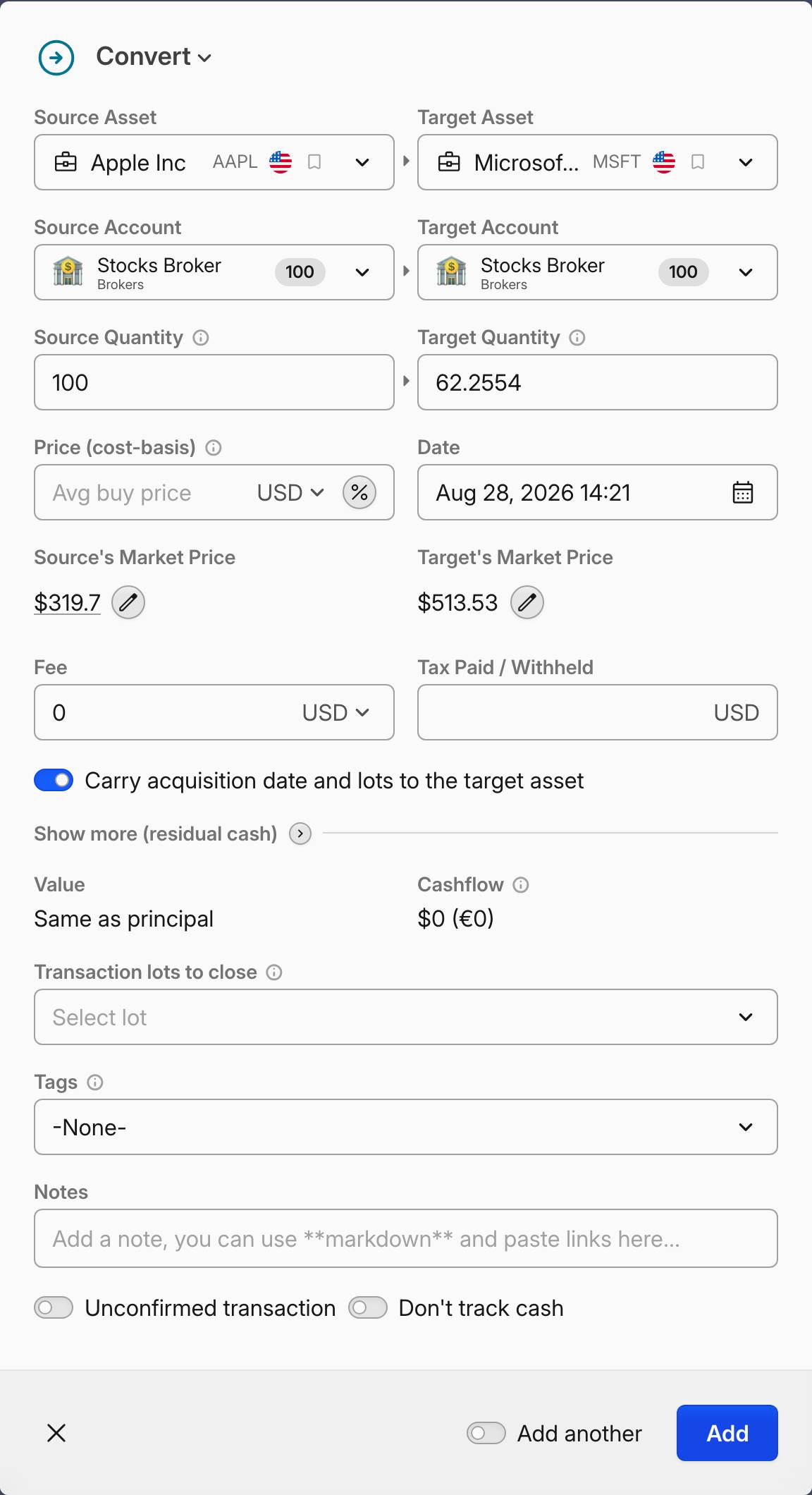 A stock-for-stock Convert with no price: the carry toggle is on
Fractional shares: If the merger produces fractional shares that are cashed out, you have two options:
- Enter the full whole shares you received as the Target Quantity and put the cash from fractional shares in the Residual cash field (expand
Show more (residual cash)to reach it), or - Add a separate
Selltransaction on the acquiring company for the fractional shares at the cash-in-lieu price
Residual cash comes out of the basis the acquirer's shares receive, and it is the one part of the merger that is disposed of.
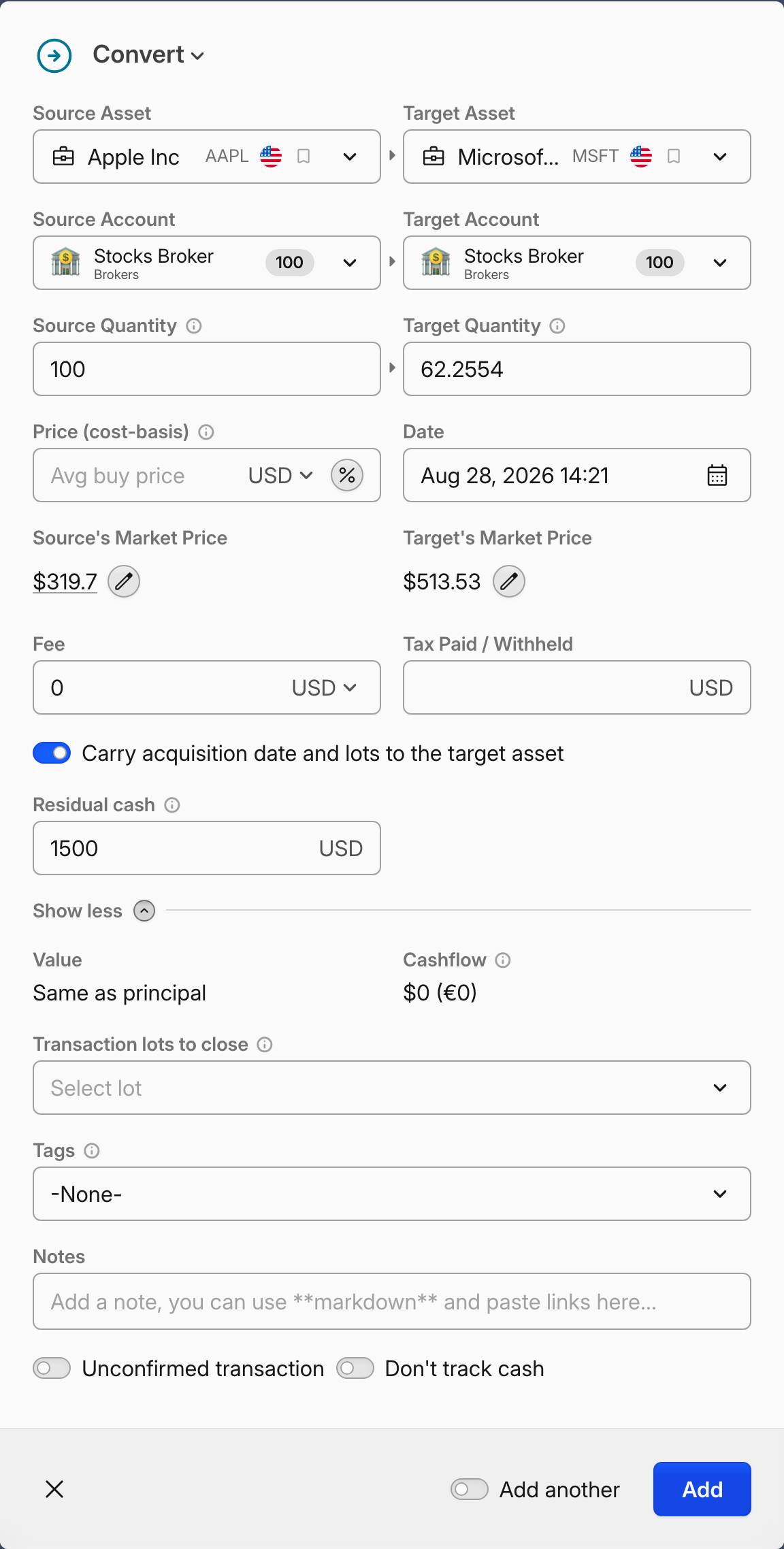 Residual cash on a Convert, under Show more (residual cash)
M&A/CompanyA acquired by CompanyB. The two sides then stay visually linked in transaction lists, which matters months later when you are reconciling the event against a broker statement.Cash Merger / Tender Offer
What happens: All your shares are bought for cash at a fixed price. This is a fully taxable event.
How to record: Use a standard Sell transaction at the tender or acquisition price per share. No special handling needed — this is just like a regular sale.
Mixed Merger (Stock + Cash)
What happens: You receive new shares in the acquiring company plus a cash payment. Gain is typically recognized up to the amount of cash received.
How to record: Use a Convert transaction:
- Set the Source Quantity to all shares of the acquired company
- Set the Target Asset and Target Quantity to the shares received
- Set the Price (cost-basis) field to encode the recognized gain: calculate it as (original cost basis + recognized gain) / quantity
- Expand
Show more (residual cash)and enter the cash received in the Residual cash field
A price on a conversion into a different asset turns Carry acquisition date and lots to the target asset off, and that is what produces the recognition: the acquired shares close at the price you set, the difference against their own cost is realized, and the target opens with those proceeds less the residual cash.
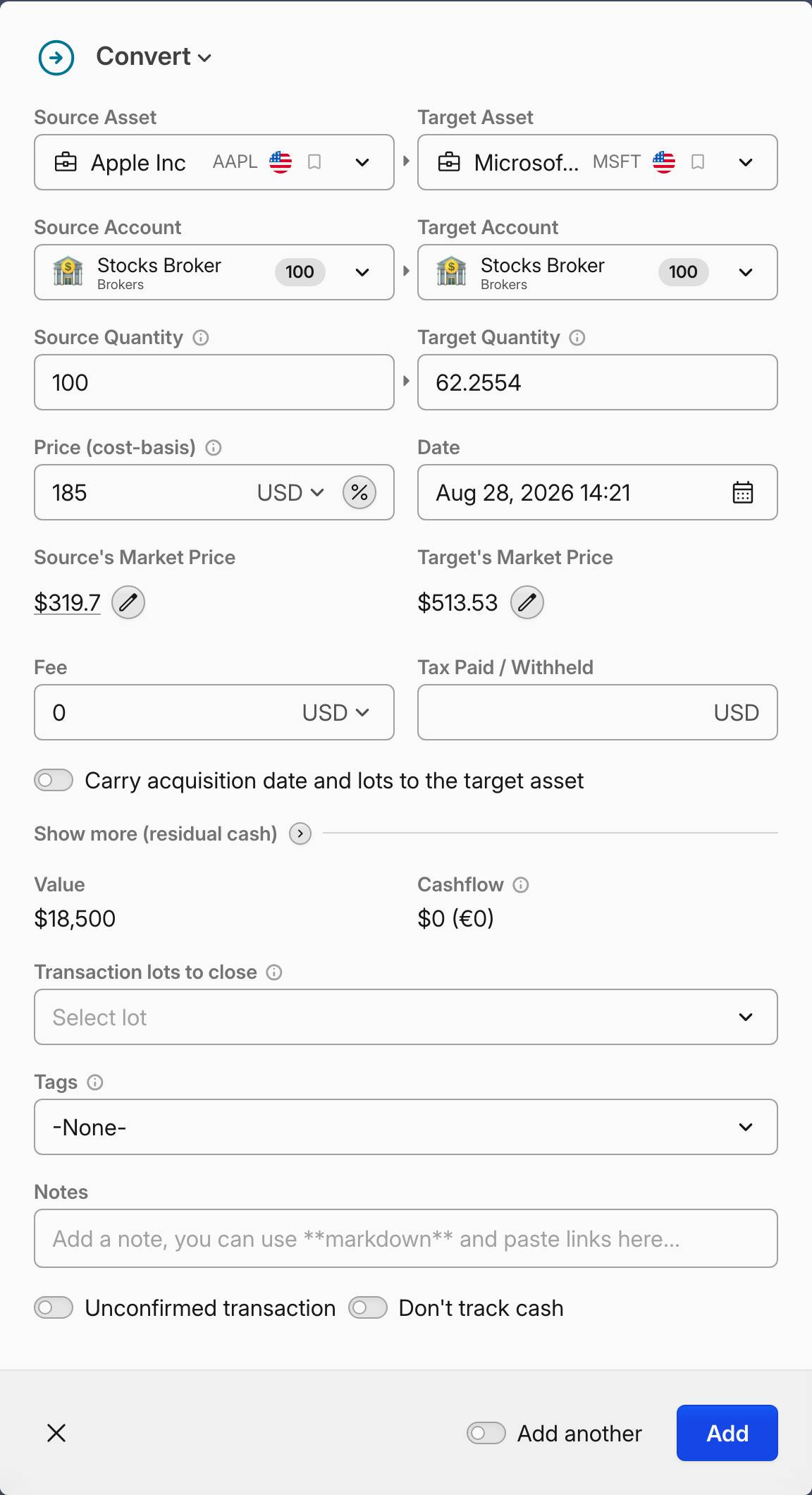 The same Convert with a price: the carry toggle turns off and the gain is recognized
Take 100 shares bought at 20, a basis of 2,000, converting into 50 shares of the acquirer. With the Price left empty and 500 of cash, the target keeps 1,500 of basis, 500 is paid out, and nothing is realized on the stock. With the Price set to 25, the source closes for 2,500 and realizes a 500 gain, and the target opens with 2,000 after the cash. Residual cash can never take the target below zero — 3,000 of cash against a 2,000 basis leaves the target at 0, not at −1,000.
Turning the toggle back on by hand does not step the stock basis up to the Price. The original basis still carries, and only the residual-cash slice is recognized.
Tax-Free Spinoff
What happens: A parent company distributes shares of a subsidiary to existing shareholders. Your cost basis in the parent is split between the parent and the new company based on an allocation ratio (usually published in the company's announcement).
How to record: Use the Convert transaction type with source quantity set to zero.
- Set the Source Asset to the parent company
- Set the Source Quantity to 0 — this tells Capitally this is a spinoff, not a regular conversion
- Set the Target Asset to the new subsidiary
- Set the Target Quantity to the shares you received
- Leave the Price (cost-basis) field empty — this keeps the cost basis based on what you actually paid for the parent stock, allocating it proportionally to the new position
Enter a Price instead when you want to set the allocation yourself. On a spinoff it is the cost basis per share of the target asset, and Value then shows what that moves out of the parent's basis — target quantity × price. Cost Basis % does the same job as a percentage of the parent's whole basis.
Either way, confirm Carry acquisition date and lots to the target asset is on. A spinoff keeps it on with or without a Price, and it is what makes the child inherit the parent's acquisition dates instead of starting a fresh holding period on the spinoff date. Parent and child each keep one lot per original purchase, splitting basis, acquisition fees and paid tax between them: 100 parent shares bought at 20 with 10 child shares created at a Price of 15 leave the parent holding 1,850 and the child 150, both still dated to the original buy.
Residual cash: If you received cash instead of fractional shares, expand Show more (residual cash) and enter the amount in the Residual cash field. On a spinoff this amount is added to the cost basis reduction on the parent position rather than taken out of the child's basis, and the reduction is capped by the basis the parent actually has.
What Capitally does automatically:
- Reduces the parent company's cost basis proportionally across all lots
- Opens a new position in the subsidiary with the allocated cost basis
- Links the two sides as "Spinoff From" and "Spinoff To"
Taxable Spinoff
What happens: Similar to a tax-free spinoff, but the fair market value of the received shares is taxable as dividend income. The parent's cost basis remains unchanged.
How to record: Use two separate transactions:
- A
Dividendon the parent company for the taxable income amount (the FMV of received shares) - A
Buyof the new subsidiary shares at the fair market value per share
Return of Capital Distribution
What happens: A distribution from a company that returns your invested capital rather than paying out earnings. This is not taxable income — instead, it reduces your cost basis. Common with REITs, MLPs, income trusts, and ETFs that distribute more than their earnings.
How to record: Use a Dividend transaction.
- Enter the Return of Capital amount in the Return of Capital field
If the distribution is entirely Return of Capital, you can leave the dividend Value field empty and only fill in the Return of Capital amount. If the distribution includes both regular dividend income and a Return of Capital portion, enter the total distribution in the Value field and the RoC portion in the Return of Capital field.
What Capitally does:
- The Return of Capital portion reduces your cost basis proportionally across all lots
- The remaining portion (Value minus Return of Capital) is treated as regular dividend income
- If the Return of Capital exceeds your total cost basis, the excess is treated as income (since your basis cannot go below zero)
For more details, see Tracking Dividends.
Liquidation
What happens: A company winds down and distributes its remaining assets to shareholders over time. Each distribution recovers your cost basis first; once the basis is fully recovered, further distributions become capital gains.
How to record: Record each distribution as a Dividend with a Return of Capital amount:
- For each liquidating distribution, create a Dividend transaction with the full amount entered as Return of Capital
- Capitally automatically tracks your remaining cost basis and treats any excess as income
- When the company is fully liquidated, record a
Sellof your remaining shares at the final distribution price (or $0 if shares are cancelled with no further payment)
Cash in Lieu
What happens: You are paid cash for a holding instead of keeping the shares. It usually shows up on a statement after an issuer goes bankrupt, or when a broker closes out its obligation to you in cash rather than transferring the shares to another institution.
How to record: Use a Sell transaction for the position at the cash amount you received. No special handling is needed — Capitally realizes the gain or loss against your cost basis exactly as it would for an ordinary sale. If the shares were cancelled with no payment, record the Sell at 0.
Cash in lieu of fractional shares is a different case. When a merger or spinoff pays cash instead of a fraction of a share, that cash belongs in the Residual cash field on the Convert, not in a separate position — see Tax-Free Merger and Tax-Free Spinoff.
For the neighbouring cash-out cases, see Cash Merger / Tender Offer and Liquidation.
Rights Offering
What happens: The company gives existing shareholders the right to purchase additional shares at a discounted price.
How to record:
- If exercised: Use a
Buytransaction at the subscription price - If sold: Track the rights as a separate asset. Record a
Transfer Inwhen you receive them, thenSellwhen you sell the rights - If expired: No transaction needed. If you tracked them as an asset, record a
Transfer Outto remove them from your portfolio
Preferred-to-Common Conversion
What happens: Preferred shares are converted to common shares at a conversion ratio. Usually not a taxable event.
How to record: Use the Convert transaction type with the Price (cost-basis) field left empty, so the lots carry over to the new common shares with their acquisition dates and cost basis intact.
Name or Ticker Change
What happens: The company changes its name or trading symbol but nothing else changes about your position.
How to record: No transaction is needed. Simply edit the asset details (name, ticker symbol) in Capitally. Since Capitally tracks assets by internal ID, not by ticker, your history remains intact. Renamed symbols are detected automatically in most cases, so prices keep flowing without any action on your side.
If prices stop updating after the rename: edit the asset, open the Prices tab and re-pick the entry in Source prices using this market symbol — even when the dropdown already shows what looks like the right symbol. Re-selecting it is what refreshes a mapping the data provider changed underneath. See Prices, symbols and market data for the neighbouring delisted and removed-symbol cases.
If you cannot find the asset under its new name: search by ISIN instead. Data providers often keep a rebranded company indexed under its former name for a while — K2 Internet rather than Fabrity Holding — so a name search returns nothing while the ISIN resolves straight to it. See Choosing the right market symbol.